A TON wallet holds the key to your account on The Open Network, the blockchain that grew up next to Telegram. On TON, the wallet is itself a small smart contract that holds Gram, the coin many people still call Toncoin, plus tokens called jettons, such as USDT.
That design explains most of what's unusual here. Your address comes in two spellings, UQ... and EQ.... A new wallet can receive right away, but its contract only goes live with its first outgoing transfer. And a recovery phrase from one TON app doesn't always open the same address in another. Each of these is explained below, with figures as of October 2026.
TON at a glance#
Item | TON |
|---|---|
Native coin | Gram (GRAM), formerly Toncoin (TON), with 9 decimal places |
Address format | 48 characters; |
Wallet | A smart contract; Keylo uses wallet v4R2, while most newer apps default to W5 |
Fees | About 0.0004 Gram for a plain transfer and 0.001 Gram for USDT, per ton.org |
Speed | Blocks about every 0.4 seconds and finality in about 0.6 seconds, per ton.org; a transfer settles within seconds |
Token standard | Jettons (USDT master |
Explorer | |
In Keylo | Send and receive Gram and jettons, comments, history, TON Testnet; no staking, swaps, NFTs or TON Connect |
How a TON wallet works#
On most chains, an address comes straight from a key. On TON, every account is a contract, and your wallet is a contract that accepts orders signed with your key.
Your TON wallet address: UQ vs EQ#
You can write the same account several ways. The raw form is 0: followed by 64 hex characters. Wallets show a friendlier 48-character form with a checksum, and its first letters carry a flag:
UQ...is non-bounceable. If something goes wrong, coins sent here stay rather than bouncing back. That's the right form for wallets, including new ones.EQ...is bounceable. If the receiving contract fails to process a message, the coins return to the sender. It suits contracts that are already deployed, such as apps.0Q...andkQ...are the testnet versions of the two.
UQ and EQ versions of one address point to the same account and balance. The flag only tells the sender's wallet whether to ask for a bounce. That matters for a wallet that hasn't been deployed yet: a bounceable transfer to it comes back to the sender minus fees, while a non-bounceable one stays. The TON address docs recommend non-bounceable addresses for wallets, and Keylo shows yours in the UQ form.
Wallet versions: W5 vs v4R2#
Because the wallet is code, the address depends on the contract version as well as your key. Keylo deploys wallet v4R2. TON's docs say most wallet apps now create W5 (V5R1) wallets by default, while Telegram uses its own WalletTg contract. The same key in a different version produces a different address with its own balance.
The contract doesn't exist on chain until you first send something. Until then, your address can receive coins but shows as inactive. Your first outgoing transfer deploys the contract, and Keylo warns you that it adds a small one-time fee.
Gram or Toncoin: what the coin is called now#
The native coin of TON now goes by Gram, with the ticker GRAM. As of October 2026, ton.org calls Gram "the native coin of the TON blockchain" and notes it "was also known as Toncoin". CoinMarketCap and CoinGecko list it as Gram, previously Toncoin. The network itself is still TON.
It's the same coin under a new name, so your address and balance don't change. Keylo still labels the coin TON, and you may see either ticker on exchanges.
How to choose a TON wallet: Telegram, app or web#
TON wallets fall into a few groups:
Keeper, formerly Tonkeeper, runs on iOS, Android, macOS, the web and as a browser extension. Its mobile app now also covers Tron, Ethereum, Bitcoin, Solana and more, and its site lists staking, cross-chain swaps and Battery, which lets you send USDT without holding Gram for fees.
Telegram's built-in wallet sits inside the messenger. ton.org describes it as the non-custodial Gram Wallet from the Telegram team.
Hardware wallets keep the key on a separate device, the safer place for savings.
Exchanges hold coins for you and control withdrawals.
A good TON wallet shows the UQ form for receiving, warns before you send to an inactive or bounceable address, and hides or labels fake jettons. Many TON users also want TON Connect, which signs into Telegram mini apps and TON dapps.
Keylo fits people who want to keep and send Gram and USDT on TON from a browser, alongside wallets on other chains under one phrase. It isn't the right tool for mini apps, staking or NFTs, and it can't open phrases from many TON-native apps, as explained below.
How to create a TON wallet in Keylo#
Keylo is a browser wallet that works on phones and computers. You can save it to your home screen like an app.
Head to the Keylo sign-up screen and complete Full name, Email, Phone number, Password and Confirm password. Agree to the terms and hit Create account.
When "Check your inbox" appears, confirm your email.
Choose Create a new wallet at "Set up your wallet". Your browser makes a 12-word recovery phrase, then encrypts it with a key derived from your password through Argon2id and AES-256-GCM. Keylo stores the encrypted result, never the words.
Pick TON in your asset list to see your
UQaddress. On chain it stays inactive until your first outgoing transfer, which is normal.Save the phrase: Settings, then Recovery phrase. Enter your password, write the words on paper and confirm the ones Keylo picks.
Set up Two-factor authentication and an Anti-phishing code in Settings as well.
There's no recovery desk. A password reset can't decrypt the wallet, so your paper copy of the phrase is the backup that counts.
Can you import a Keeper or Telegram phrase?#
Often not, because TON apps use several phrase standards. Keylo imports BIP-39 phrases and derives TON on m/44'/607'/0'. Many TON apps use different schemes, as the TON mnemonics docs explain:
Classic 24-word TON phrases, used by Tonkeeper and other TON apps for years, follow TON's own standard, not BIP-39. Keylo usually rejects them, and if one happens to pass, it opens a different, empty address.
Telegram's wallet runs its own WalletTg contract, and per TON's docs its 24-word phrase is two 12-word halves. Keylo treats all 24 words as one phrase, so it rejects them or derives the wrong key, and it can't operate that contract anyway.
Multichain 12- or 24-word phrases use BIP-39 and the same path as Keylo. Even then, the address only matches if the other app also uses wallet v4R2.
If the address in Keylo doesn't match, your funds are safe in the old wallet. Send them from there to your Keylo UQ address instead.
Practice on TON Testnet#
Under Settings, Networks, turn on Testnet mode to add TON Testnet. TON's testnet bot on Telegram hands out free test Gram, and testnet addresses start with 0Q. Try a first transfer there to watch the wallet contract deploy.
Get your TON address in a minute
Sign up with an email and a password. Keylo builds the wallet in your browser and shows your UQ address straight away.
How to receive Gram and USDT on TON#
Select Receive, then TON. The screen shows "Receive on TON", a QR code and "Your TON address" in the
UQform.Use Copy or Share, or let the sender scan the code.
When withdrawing from an exchange, choose the TON network. For USDT, pick USDT on TON, not TRC20 or ERC20.
Then check your TON activity. Transfers usually appear within a few seconds, each with a Tonviewer link.
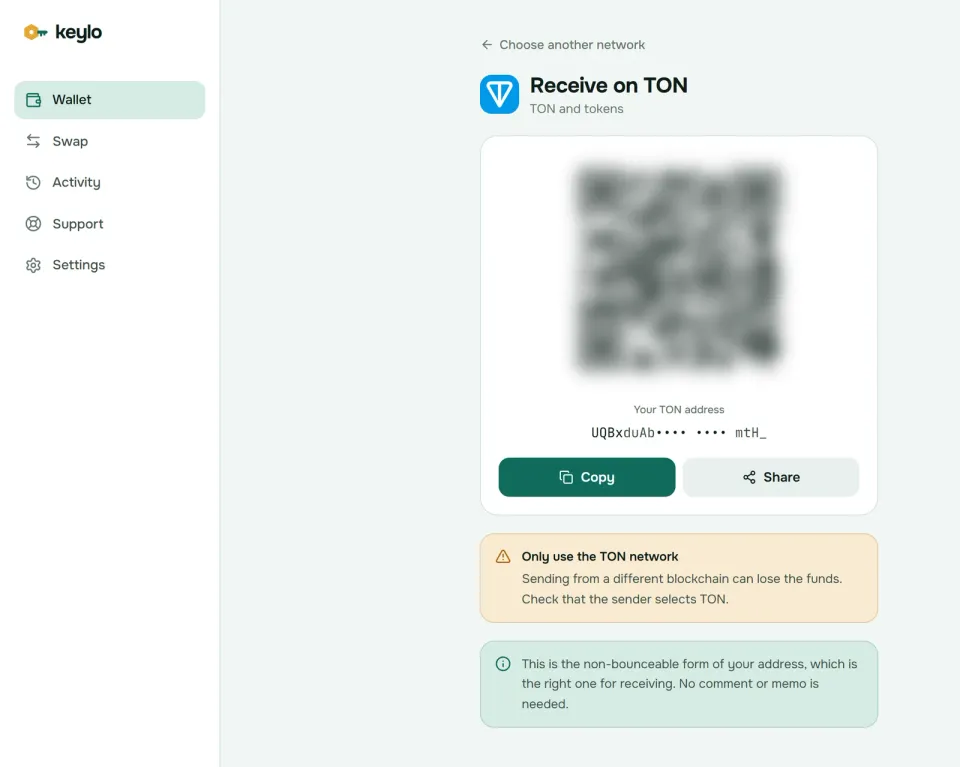
You don't need a comment to receive into your own wallet, and Keylo's Receive screen says so. USDT and other jettons arrive at the same UQ address, and the sender pays to set up your jetton wallet.
How to send Gram and jettons on TON#
Select Send and pick TON or a jetton such as USDT.
Paste or scan the address into To. Keylo accepts
UQ,EQand raw forms, and rejects testnet addresses on mainnet. It can't look up.tonnames, so paste the full address.Add a Comment if an exchange asked for one.
Enter an amount or choose Max. For Gram, Max empties the wallet, fee included.
Choose Review. TON doesn't have a fee auction, so instead of Slow, Normal and Fast you see one fee.
Check the network, the recipient's bold first and last six characters, the comment and the fee, then choose Send. The status goes from "On its way" to "Sent", and View on Tonviewer opens the transfer.
Comments (memos) for exchange deposits#
TON calls its memo a comment. Some exchanges receive every customer's deposits at one address and use the comment, sometimes labeled memo or tag, to credit you. Copy it exactly, because a deposit with a missing or wrong comment can sit at the exchange until support sorts it out. Keylo puts the comment inside the jetton transfer for USDT too, so exchanges see it there. Never put personal details in a comment: anyone can read it on the explorer.
What Keylo checks before you sign#
Inactive recipient. If the recipient's wallet has never been used, Keylo sends a non-bounceable transfer and asks you to double-check the address, because only its owner can use those coins.
Active recipient. Transfers to deployed wallets and contracts go out bounceable, so a failure returns the coins.
First send. Keylo tells you this transfer also deploys your wallet contract.
Jetton fees. For USDT, Keylo attaches 0.05 Gram (shown as 0.05 TON) to pay for processing, and the unused part comes back to you a few seconds later.
Frozen accounts. Keylo won't send Gram to a frozen account, and it stops if your own wallet has frozen.
Jettons and USDT on TON#
Tokens on TON are jettons. Each jetton has a master contract, and every holder gets a small jetton wallet tied to their address. A USDT transfer is really a message from your jetton wallet to the recipient's, which is why it needs Gram for fees.
Tether issues USDT directly on TON. The master address is EQCxE6mUtQJKFnGfaROTKOt1lZbDiiX1kCixRv7Nw2Id_sDs, as listed on Tether's site. Anyone can launch a jetton called USDT, so the master address is the only thing that counts.
Keylo finds the jettons your address holds and leaves out ones the TON indexer flags as scams. To add one yourself, go to Settings → Custom tokens → Add token and enter its master address, symbol and decimals. Liquid staking tokens are jettons too, so they sit in Keylo like any other token, though Keylo can't create them.
TON network fees and speed#
TON fees cover computation, message forwarding and a small storage charge, all paid in Gram. They're low: ton.org puts a Gram transfer at about 0.00039 Gram and a USDT transfer at about 0.001 Gram as of October 2026, and says fees don't depend on network load. Plain transfers we sampled on October 24, 2026 cost 0.00036 to 0.00044 Gram, a fraction of a cent.
A few things add a little, but not much:
The first send deploys your wallet contract once.
A recipient without USDT needs a new jetton wallet, which your transfer pays for.
Long comments make the message bigger.
Speed is also quick. ton.org puts block time at about 0.4 seconds and finality at about 0.6 seconds, and the masterchain blocks we sampled on October 24, 2026 came roughly every half second. A transfer passes through several messages, so Keylo usually shows "Sent" within a few seconds. There's no Speed up.
Accounts also pay a tiny storage fee over time. A wallet with a normal balance never notices. A nearly empty one left for years, however, freezes once its unpaid storage passes 0.1 Gram, and reviving a frozen account takes more than a top-up.
What Keylo doesn't do on TON#
No TON Connect. There's no extension or WalletConnect, so Keylo can't sign into Telegram mini apps or TON dapps.
No staking. Keylo stakes only on Cosmos chains. Use a wallet with TON staking, or hold liquid staking jettons.
No swaps. Keylo's swap routes don't include TON, so convert Gram or USDT on an exchange.
No NFTs, usernames or gasless transfers. Keylo can't show or send TON NFTs, and USDT always needs Gram for fees.
No hardware wallets and no card purchases. Buy Gram or USDT on an exchange and withdraw on the TON network.
Keylo never holds a copy of your keys it could open. If both the password and the phrase are lost, no one can restore the wallet. The list of supported networks shows everything else Keylo covers.
TON scams and mistakes to avoid#
Many TON scams start inside Telegram, where a message, a bot or a mini app can look official.
Fake support in Telegram. Accounts posing as wallet staff or "TON support" ask for your phrase. Keylo staff never do; use the Keylo help center.
Shared phrases. A stranger posts the phrase of a wallet holding USDT and asks for help moving it. Any Gram you send for fees usually gets swept by a bot. Never fund a wallet whose phrase someone handed you.
Fake jettons and NFTs. Tokens or NFTs you didn't ask for, often with a link in the name or comment, lead to drainer sites. Check the USDT master address and ignore the rest.
Wrong network. USDT on Tron or Ethereum can't reach a
UQaddress. Pick USDT on TON.Missing comments. Exchange deposits without the right comment can get stuck.
Before your first real TON transfer:
The phrase is on paper and confirmed in Keylo.
The wallet holds a little Gram for fees and the one-time deployment.
The exchange network says TON.
You've copied the comment for any exchange deposit.
A small test arrived before the full amount.
USDT also lives on Tron and Solana under the same Keylo phrase. The Tron wallet guide and the Solana wallet guide cover their fees.
Hold Gram and USDT in a wallet only you control
Keylo signs every TON transfer in your browser, warns about inactive recipients and fake jettons, and never sees your recovery phrase.
TON wallet FAQ#
What is the best TON wallet?
It depends on what you do on TON. For Telegram mini apps, staking and NFTs, a TON-first wallet such as Keeper or Telegram's built-in wallet makes sense. For holding and sending Gram and USDT from any browser, next to wallets on other chains, Keylo works. Large balances belong on a hardware wallet.
Can I use Keylo inside Telegram?
No. Keylo isn't a Telegram mini app or bot, and it can't sign in to mini apps through TON Connect. It's a web wallet you open in a phone or computer browser, and you can add it to your home screen. For a wallet inside the messenger, use Telegram's built-in wallet, and keep Keylo for holding and sending Gram and USDT next to your other chains.
What is the difference between W5 and v4R2 wallets?
They're two versions of TON's standard wallet contract. W5 (V5R1) is newer: it can bundle up to 255 messages in one request and supports gasless transfers through a relayer, and most apps now create it by default. v4R2 is the older version, which Keylo uses. One key gives a different address in each version, so check which one holds your funds.
What is the difference between UQ and EQ addresses?
They're two spellings of the same account and balance. UQ marks an address as non-bounceable, so coins sent to it stay even if the wallet is new. EQ marks it bounceable, so a failed message returns the coins, including a transfer to a wallet that isn't deployed yet. That's why wallets share the UQ form for receiving.
Is Toncoin now called Gram?
Yes. As of October 2026, ton.org calls the native coin Gram (GRAM) and notes it was also known as Toncoin, and the major price sites list it as Gram. It's the same coin on the same network, so addresses and balances don't change. Keylo and some exchanges may still show the older TON ticker.
Can I import my Tonkeeper or Telegram wallet phrase into Keylo?
Usually not. Classic 24-word TON phrases from Tonkeeper and similar apps aren't BIP-39 phrases, and Telegram's wallet splits its 24 words into two halves. Keylo reads standard BIP-39 phrases on m/44'/607'/0' with wallet v4R2. If the address doesn't match after importing, keep the old wallet and send your funds to your Keylo address.
Do I need a comment to send Gram to an exchange?
Only if the exchange gives you one. Exchanges that pool deposits at a single address use the comment, sometimes labeled memo or tag, to credit your account, so copy it exactly. If the exchange shows a personal deposit address with no comment, leave the field empty. Receiving into your own Keylo wallet never needs a comment.
How much does it cost to send USDT on TON?
About 0.001 Gram as of October 2026, per ton.org, which is a fraction of a cent. Keylo attaches 0.05 Gram to cover processing and the unused part returns to you within seconds. A recipient who has never held USDT costs slightly more, because your transfer creates their jetton wallet. You need Gram in your wallet either way.
Why does my new TON wallet show as inactive?
Your wallet is a smart contract, and TON only deploys it with your first outgoing transfer. Until then the address can still receive Gram and jettons safely, which is why wallets share the non-bounceable UQ form. When you first send, Keylo deploys the contract in the same transaction and shows the small one-time fee.
Can I stake Gram in a web wallet?
Not in Keylo, which offers staking only on Cosmos SDK chains. On TON it holds, sends and receives Gram and jettons. To stake, use a TON wallet with staking, such as Keeper, or a liquid staking service. Liquid staking tokens are ordinary jettons, which Keylo can hold and send, but it can't mint them for you.