An Ink wallet is a wallet that holds ETH and tokens on Ink, the Ethereum layer 2 built by the team behind the Kraken exchange. Ink runs on the OP Stack, and its own site calls it the house of DeFi for the Superchain. For you, that means a familiar 0x address, a new block every second and gas paid in ETH.
This page is about Ink the blockchain, often called Ink chain. The usual path in is simple: you hold ETH or stablecoins on Kraken and want them on Ink, in a wallet you control. This page covers that move, plus the fees, bridges and scams specific to Ink. Facts are current as of October 2026.
Ink at a glance#
Item | Ink |
|---|---|
Built by | The team behind Kraken; mainnet since December 2024 |
Network type | OP Stack rollup on Ethereum, a Superchain member, Stage 1 on L2BEAT since January 2025 |
Gas token | ETH |
Chain ID | 57073 |
Address format |
|
Block time | 1 second |
Typical fee | Hundredths of a cent or less on October 24, 2026 |
Standard withdrawal | Around one week before funds can be claimed on Ethereum |
Stablecoins | Native USDC from Circle, USDT0, and Stargate's bridged USDC.e |
Explorer | |
In Keylo | ETH and ERC-20 sends and receipts, full history, automatic token detection, speed-up, a view-only Collectibles list, swaps and bridges through LI.FI. Ink testnet not included |
Kraken account, Kraken Wallet or your own Ink wallet#
Three kinds of account can hold your funds on or near Ink, and they differ in who controls the keys.
A Kraken exchange account holds your crypto for you. It's where you buy, and it can send funds onto Ink, but Kraken controls the keys.
Kraken Wallet is Kraken's separate self-custody app for iOS, Android and the web. It supports Ink alongside Bitcoin, Ethereum, Solana and Base.
Any other EVM wallet, Keylo included, can hold an Ink address, because Ink speaks Ethereum's language.
The difference matters when something goes wrong, because an exchange can pause withdrawals or freeze an account. With a self-custody Ink wallet, nobody can do that, but nobody can reset it for you either.
Your Ink wallet address#
Ink uses Ethereum accounts, so your Ink wallet address is the 0x address you already have on Ethereum and other EVM chains. Keylo derives it from your phrase on the standard path m/44'/60'/0'/0/0, which MetaMask also uses for its first account.
Think of each network as a separate account at the same address. So ETH on OP Mainnet or Base won't show up on Ink until you bridge it. There's no activation step, memo or reserve to worry about.
What to look for in an Ink wallet#
Ink is built for DeFi. Tydro, a lending and borrowing protocol powered by Aave, is one of the apps Ink features, and there are exchanges and stablecoin markets too. But using any of those needs a wallet that connects to websites.
Kraken Wallet connects to Ink apps, and it's the natural choice if you already trust Kraken.
MetaMask and similar extension wallets add Ink by chain ID and connect to its DeFi apps.
Hardware wallets keep the key on a device and pair with one of the wallets above.
Web wallets like Keylo hold, send, swap and bridge without connecting to apps.
Look for three things. The fee should include Ink's Ethereum data cost, the wallet should show token contracts, and it should warn when you send to a contract.
Keylo fits if you mainly want to hold ETH and stablecoins on Ink, move them and swap between networks. However, it's not the tool for Tydro or other Ink apps.
What Keylo leaves out on Ink#
No dapp connections. Keylo has no extension and no WalletConnect, so it can't lend, borrow or trade on Ink apps.
No NFT transfers. Keylo shows Ink NFTs in a read-only Collectibles list, but can't send them.
No staking. Keylo's staking runs only on Cosmos SDK chains, not on Ink.
No Ink testnet, hardware wallets or card purchases. Buy ETH on Kraken and withdraw it to Ink.
Keylo also doesn't hold your keys. If both your password and recovery phrase are lost, the wallet is gone for good.
Creating an Ink wallet in Keylo#
You need a browser and a few minutes. Keylo already lists Ink, so there's no network to add.
Head to Keylo's sign-up page. Type your full name, email, phone number and a password, then retype the password, tick the terms and hit Create account.
Confirm your email if Keylo says to check your inbox.
Hit Create a new wallet. Your browser creates a 12-word recovery phrase and encrypts it with a key derived from your password, using Argon2id and AES-256-GCM. Only the encrypted version goes to Keylo.
Open Ink from the list of networks. Your address and balance are there.
Save the phrase offline. Go to Settings, then Recovery phrase, confirm your password, write down the 12 words and answer the check questions.
Back in Settings, enable Two-factor authentication, set an Anti-phishing code and choose how soon Keylo should Lock automatically.
Keep the paper somewhere safe, because a password reset gets you into your account but can't decrypt the wallet. Only the phrase restores it.
Bringing in a wallet you used on Ink#
Hit Import a recovery phrase and type the 12 or 24 words from MetaMask, Kraken Wallet or another phrase-based app. Your first account appears with the same Ink address, because Keylo uses the common path. Extra accounts from that app won't appear, but they stay safe in it. A Kraken Wallet embedded wallet, made with an email or social login, has no phrase to type in, so send from it instead.
No Ink testnet in Keylo#
Keylo's testnet mode doesn't include Ink Sepolia. So for a first try, send a small real amount; at Ink's fees, a test transfer costs almost nothing.
Get your Ink address in a minute
Use your email and a password to register. The keys are made in your browser, and your 0x address is ready on Ink before you leave the page.
How to move ETH from Kraken to your Ink wallet#
Ink's own site lists Kraken as a way in: buy crypto there and move it onto Ink. Kraken's list of assets per network can change, so check the withdrawal screen for Ink before you start.
In Keylo, hit Receive and choose Ink. You'll see "Receive on Ink", a QR code and "Your Ink address".
Hit Copy, or keep the code on screen to scan.
In Kraken, start a withdrawal of ETH, add your Ink address and pick Ink as the network.
Check the address ends, confirm the withdrawal and approve any Kraken security prompts.
Watch for the deposit in Keylo's activity. Ink makes a block every second, so it shows soon after Kraken sends it.
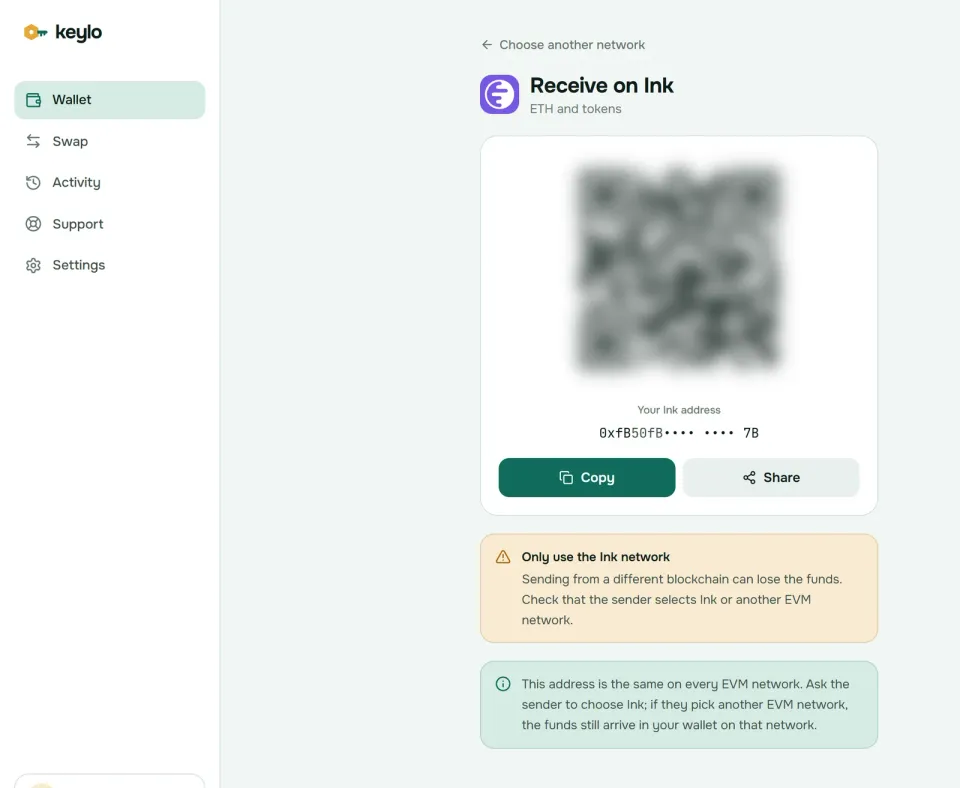
The Receive screen points out that EVM networks share this address. If a withdrawal goes out on Ethereum, OP Mainnet or Base by mistake, it still reaches you on that network. Open that network in Keylo, then bridge to Ink.
If Kraken doesn't offer Ink for a token you want, withdraw it on a network it does offer, then bridge it across in Keylo.
Sending ETH and tokens on Ink#
Hit Send and choose ETH or a token on Ink.
Paste or scan the recipient into To. Keylo validates the address and its checksum.
Enter an amount or hit Max. When you send ETH, Max keeps the fee aside.
Hit Review and choose Slow, Normal or Fast.
Check the summary of network, recipient and fee. The recipient appears in full, with its start and end in bold.
Hit Send. Keylo signs in your browser, then shows "On its way", "Sent" and a View on Blockscout link.
Keylo simulates the transfer first, so one that would fail stops before you pay gas. It flags contract recipients, since tokens sent to a contract that doesn't expect them are usually lost. It also refuses a send to the token's own contract.
If you send to Kraken, check that Kraken accepts that exact token on Ink. A deposit on an unsupported network or token can mean a slow recovery request with the exchange.
Stablecoins on Ink: USDC and USDT0#
Two dollar tokens are the ones to know on Ink, and you should check both by contract, not by name.
USDC at
0x2D270e6886d130D724215A266106e6832161EAEdis issued on Ink by Circle. You can confirm it on Circle's contract list.USDT0 at
0x0200C29006150606B650577BBE7B6248F58470c1is a cross-chain version of Tether's USDT, backed by USDT locked on Ethereum. Ink's site links a native USDT0 bridge for moving it onto the network.
You may also meet USDC.e at 0xF1815bd50389c46847f0Bda824eC8da914045D14, USDC bridged in by Stargate. It isn't Circle's native USDC, so check which one an exchange accepts.
Keylo reads Ink's explorer index, so every token your address holds shows up on its own, and incoming transfers appear in Activity. If one still doesn't, add it under Settings, Networks, Custom tokens with its contract, symbol and decimals. Treat names and logos as decoration, because anyone can deploy a token that copies them.
Ink network fees and speed#
Ink's documentation splits each fee into two parts, both paid in ETH. The execution fee pays for running your transaction on Ink. The security fee pays for publishing it to Ethereum. Ink's docs say it's usually the larger of the two, though in October 2026, with Ethereum blob space cheap, it was the smaller part. Other OP Stack chains call it the L1 data fee.
Keylo asks Ink's fee contract for the security fee when it prepares a transfer. It pads that amount slightly and adds it to Slow, Normal and Fast alike, so what the review screen shows is the whole cost. Keylo adds no fee to a normal send.
Fees are tiny, so you can afford to test. On October 24, 2026, Ink's base fee was a sliver of a gwei, and most of the gas price was the 0.001 gwei tip the network suggests. A plain ETH transfer cost about 0.00000002 ETH, roughly $0.00005, and a token transfer a little over twice that.
Because blocks come every second, Normal is almost always enough. If a transfer is still pending, Speed up sends a replacement with a higher fee. Fees can rise when Ethereum is busy, since the security fee follows Ethereum's prices.
Bridging to and from Ink#
Deposits onto Ink are quick, but the way out through the standard bridge is slow. L2BEAT says a withdrawal must wait seven days after you prove it on Ethereum, so plan on about a week before you can claim the funds there.
Ink's bridge list names Across, Brid.gg, Bungee, Gelato, Rhino.fi, Reservoir and Superbridge. Fast bridges like Across avoid the seven-day wait by paying you from their own liquidity.
Keylo gets those kinds of routes through LI.FI, so you can bridge without a separate site.
Hit Swap, then set You pay to the asset you're moving and the network it's on now.
Under You receive, choose Ink and the token you want, or another network if you're leaving Ink.
Compare the routes by amount, time and fees.
Look at Minimum you receive; Delivered to should name your own address on the other side.
Approve the exact amount if Keylo asks, then hit Bridge and follow the progress.
The same screen also trades tokens within Ink, such as ETH for USDC, and caps slippage at 0.5% unless you change it. When a bridge can't deliver, the funds go back to your wallet, possibly in a different token. A Keylo service fee, if any, has its own line. The swap and bridge page explains routes and refunds.
Ink scams and safe habits#
Ink's link to Kraken makes Kraken's name a favorite tool for scammers. Most attacks aim at your signature or your recovery phrase.
Fake Kraken support. Messages or calls about a "locked Ink wallet" are fake. Real support never asks for a phrase or password, Kraken's or Keylo's.
Token claims. Links promising an Ink token or a points reward lead to drainers. Check anything token-related on inkonchain.com, and never sign on a site you reached from a direct message.
Lookalike DeFi sites. Copies of Ink apps ask you to approve unlimited spending. Keylo can't sign those requests, but a connecting wallet can.
Address poisoning. Dust from addresses that mimic yours waits for you to copy the wrong one. Copy from the source instead.
For help with Keylo, use the support page, and read how Keylo secures your wallet.
Before moving a real amount, confirm:
The 12 words are on paper and confirmed in Keylo.
Some ETH is on Ink for gas.
Kraken's network field says Ink.
The stablecoin contract matches Circle's or Tether's.
A small test transfer arrived.
Your phrase also covers the other OP Stack chains. The Soneium wallet guide and the Base wallet guide explain two of them, and the networks page lists all of Keylo's.
Hold ETH and stablecoins on Ink in a wallet only you control
Your phrase is sealed with your password before it leaves the device. Keylo can't see it, and you can move funds from any browser.
Ink wallet FAQ#
What is Ink, and is it owned by Kraken?
Ink is an Ethereum layer 2 built with the OP Stack by the team behind Kraken, live since December 2024 and part of the Superchain. Kraken's team builds it and Kraken customers can move funds onto it, but Ink is a public network. Anyone can use it with any EVM wallet, without a Kraken account.
Is a Kraken account the same as an Ink wallet?
No. A Kraken exchange account is custodial, so Kraken holds the keys and can pause withdrawals. An Ink wallet is self-custody: you hold the key, and the funds sit at your own 0x address on Ink. Kraken Wallet, Kraken's separate app, is one self-custody option, and Keylo is another.
How do I move ETH from Kraken to Ink?
Copy your Ink address from your wallet's receive screen. In Kraken, start an ETH withdrawal, paste the address and choose Ink as the network. Check the address, confirm, and the ETH usually lands within a minute of Kraken sending it. Send a small amount first if it's your first withdrawal to that address.
How do I add Ink to my wallet?
Many EVM wallets list Ink already. If yours doesn't, add a custom network named Ink with chain ID 57073, currency ETH, RPC https://rpc-gel.inkonchain.com and explorer https://explorer.inkonchain.com. Your Ink wallet address is the same 0x address the wallet uses on Ethereum. In Keylo there's nothing to add, because Ink is already in the network list.
How long does it take to withdraw from Ink to Ethereum?
About a week through the standard bridge. You start on Ink, prove the withdrawal on Ethereum, then wait seven days, according to L2BEAT, before a final transaction on Ethereum. Fast bridges such as the LI.FI routes Keylo shows usually pay out on Ethereum within minutes, because they front the funds and wait out the delay themselves.
What is the security fee on Ink?
It's Ink's name for the part of each fee that pays for posting your transaction to Ethereum, which keeps Ink's data available to everyone. Other OP Stack chains call it the L1 data fee. Ink's docs say it's usually larger than the execution fee, but both were tiny as of October 2026. Keylo includes it in the price before you sign.
Which stablecoins work on Ink?
The main two are USDC, which Circle issues natively on Ink at the contract starting 0x2D27, and USDT0, Tether's cross-chain version of USDT. Both need ETH on Ink for gas when you move them. Check the contract before trusting any token with a dollar name, because copies with the same name and logo are common.
Does Ink have its own token?
Not one you need. Gas on Ink is paid in ETH, and as of October 2026 no official Ink network token was trading on major price trackers. Claims about an Ink token spread fast, and many link to drainer sites. Check token news only on inkonchain.com, and never enter your recovery phrase or sign an approval to claim anything.
Can I use Tydro or other Ink apps with Keylo?
No. Tydro and other Ink DeFi apps need a wallet that connects to websites, and Keylo has no browser extension or WalletConnect. You can import your phrase into Kraken Wallet or MetaMask to use those apps, and keep using Keylo to hold, send, swap and bridge on Ink.