A ZetaChain wallet is the app that holds the key to your account on ZetaChain, a proof-of-stake layer 1 built with the Cosmos SDK that runs a full Ethereum virtual machine. It holds ZETA, which pays every fee, plus ZRC-20 tokens that stand for coins on Bitcoin, Ethereum, Solana and other connected chains. Blocks are final in a few seconds, and a transfer costs a tiny fraction of a ZETA.
A ZetaChain wallet differs from most EVM wallets in two ways. The same account has two addresses, a 0x one and a zeta1 one. And a ZRC-20 token such as BTC.BTC looks like any other token in your wallet, but leaving ZetaChain with it takes a special withdrawal. Figures below are as of October 2026.
ZetaChain at a glance#
Item | ZetaChain |
|---|---|
Native coin | ZETA (18 decimals), used for gas, staking and governance |
Address formats |
|
Chain IDs | 7000 (EVM), |
Built with | Cosmos SDK, CometBFT consensus and the Cosmos EVM module |
Finality | One block, usually under five seconds |
Typical fee | About 0.0002 ZETA for a ZETA transfer (base fee 10 gwei on October 24, 2026) |
Token standards | ERC-20, plus ZRC-20 for assets from connected chains |
Unstaking wait | 21 days |
Explorer | |
In Keylo | Send, receive, automatic token detection (ZRC-20s included), full incoming and outgoing history, a read-only NFT view and speed-up, but no swap, bridge, staking or dapp connections |
How a ZetaChain wallet works#
ZetaChain runs Ethereum's account model on top of a Cosmos chain. The chain stores your ZETA and token balances, while your wallet keeps the private key and signs. Because the EVM is complete, MetaMask and other EVM wallets work without changes once they know chain ID 7000.
Your ZetaChain wallet address: 0x and zeta1#
ZetaChain's address docs explain that a 0x address and a zeta1 address made from the same public key are the same account. So you never transfer between them. Cosmos wallets like Keplr show the zeta1 form, EVM wallets show 0x, and both see the same balance.
Keylo shows and accepts only the 0x form. If someone gives you a zeta1 address, run it through ZetaChain's address converter before you paste it into To. Never edit the characters by hand, because the two forms are encoded differently.
Keylo derives ZetaChain on m/44'/60'/0'/0/0, the HD path listed in ZetaChain's network details. MetaMask uses the same path for its first account, so the same recovery phrase reaches the same funds in either app.
ZRC-20 tokens explained#
A ZRC-20 is an ERC-20-compatible token on ZetaChain that represents an asset held on a connected chain. When someone deposits BTC from Bitcoin, ZetaChain's validators keep the bitcoin in a vault there, and the depositor receives BTC.BTC on ZetaChain. The part after the dot names the home chain.
ZetaChain's own registry listed 34 ZRC-20 tokens on October 24, 2026. A few you'll meet often:
BTC.BTC
0x13A0c5930C028511Dc02665E7285134B6d11A5f4, bitcoin from Bitcoin (8 decimals)ETH.ETH
0xd97B1de3619ed2c6BEb3860147E30cA8A7dC9891, ether from Ethereum (18 decimals)USDC.ETH
0x0cbe0dF132a6c6B4a2974Fa1b7Fb953CF0Cc798a, USDC from Ethereum (6 decimals)USDT.ETH
0x7c8dDa80bbBE1254a7aACf3219EBe1481c6E01d7, USDT from Ethereum (6 decimals)SOL.SOL
0x4bC32034caCcc9B7e02536945eDbC286bACbA073, SOL from Solana (9 decimals)
USDC.ETH and USDC.ARB both stand for USDC, but they are different tokens. So each can only go back to its own chain. Also, a plain ERC-20 deployed on ZetaChain has no ZRC-20 powers, so it can't be withdrawn to another chain at all.
How to choose a ZetaChain wallet#
Because ZetaChain is both a Cosmos chain and an EVM chain, wallets from either world can work.
EVM wallets. MetaMask is the wallet ZetaChain's ZetaHub guide uses. It connects to ZetaHub for sending, staking and cross-chain moves.
Cosmos wallets. ZetaChain's docs have setup guides for Keplr and Leap, which show
zeta1addresses and handle staking and governance votes.Exchange accounts. The exchange holds the keys, so it picks which networks it supports.
Web wallets. These run in a browser tab with nothing to install. Keylo is one of them.
When you compare options, check whether a ZetaChain wallet shows ZRC-20 tokens with their full suffix, so BTC.BTC and USDC.ETH aren't confused with tokens on other chains. Next, see whether it can connect to ZetaHub, because that's how you deposit, withdraw and stake. Finally, confirm it uses the standard path, so one phrase works everywhere.
Keylo fits people who want to hold ZETA and ZRC-20 tokens, see every deposit, and send on ZetaChain from any browser. However, it's the wrong choice for moving assets in or out of ZetaChain or for staking, because Keylo can't connect to ZetaHub and has no swap, bridge or staking on this chain.
How to set up a ZetaChain wallet in Keylo#
ZetaChain is already on Keylo's network list, with chain ID 7000 built in.
On the Keylo sign-up page, enter your full name, email, phone number and a password, tick the terms box and tap Create account.
If asked, confirm your email from the "Check your inbox" message.
Choose Create a new wallet. The browser creates a 12-word recovery phrase and seals it with a key derived from your password (Argon2id, then AES-256-GCM). Keylo's server gets the sealed copy only.
Pick ZetaChain in your asset list. There's your
0xaddress.Back up the phrase: Settings, Recovery phrase, your password, then Show my phrase. Write the words down, tap I wrote them down and confirm three of them.
In Settings, also turn on Two-factor authentication and pick an Anti-phishing code.
Keylo can't recover a lost phrase, because it never had a readable copy. Resetting your password won't decrypt the old wallet either.
Importing from MetaMask or Keplr#
Choose Import a recovery phrase and enter your 12 or 24 words. A MetaMask phrase shows the same ZetaChain account. A Keplr phrase should too, as long as Keplr used ZetaChain's standard path; Keplr then shows the zeta1 form of the address Keylo shows as 0x. Convert one to the other to check before you move funds.
ZRC-20 tokens in Keylo#
Keylo reads ZetaScan's index of your address, so every ZRC-20 or ERC-20 token you hold appears by itself, under its full name such as BTC.BTC or USDC.ETH. The same index also picks up junk tokens that strangers send you, so compare a token's contract with ZetaChain's registry above before you trust its balance.
If a token you expect is missing, add it under Settings, Networks, Custom tokens, Add token: choose ZetaChain, paste the contract address, and type the symbol and decimals. Get the decimals right, because a wrong number shows a wrong balance. BTC.BTC uses 8, USDC.ETH uses 6, and USDC.BSC uses 18.
Get your ZetaChain address in a minute
Sign up with email and a password. Keylo creates the wallet in your browser, with one 0x address for ZetaChain and every other EVM network.
How to receive ZETA and ZRC-20 tokens#
Tap Receive and select ZetaChain. The screen shows "Receive on ZetaChain" and a QR code.
Tap Copy or Share, or let the sender scan it.
On an exchange, choose ZetaChain as the withdrawal network. ZETA also exists as an ERC-20 token on Ethereum, BNB Smart Chain and Polygon, so read the network name carefully.
If the exchange asks for a
zeta1address, convert your0xaddress with ZetaChain's converter and paste the result.Then open Activity on the ZetaChain page. Deposits are listed there next to your own sends once ZetaScan indexes them, each with an explorer link. A ZetaChain block is final as soon as it's produced, about every four seconds.
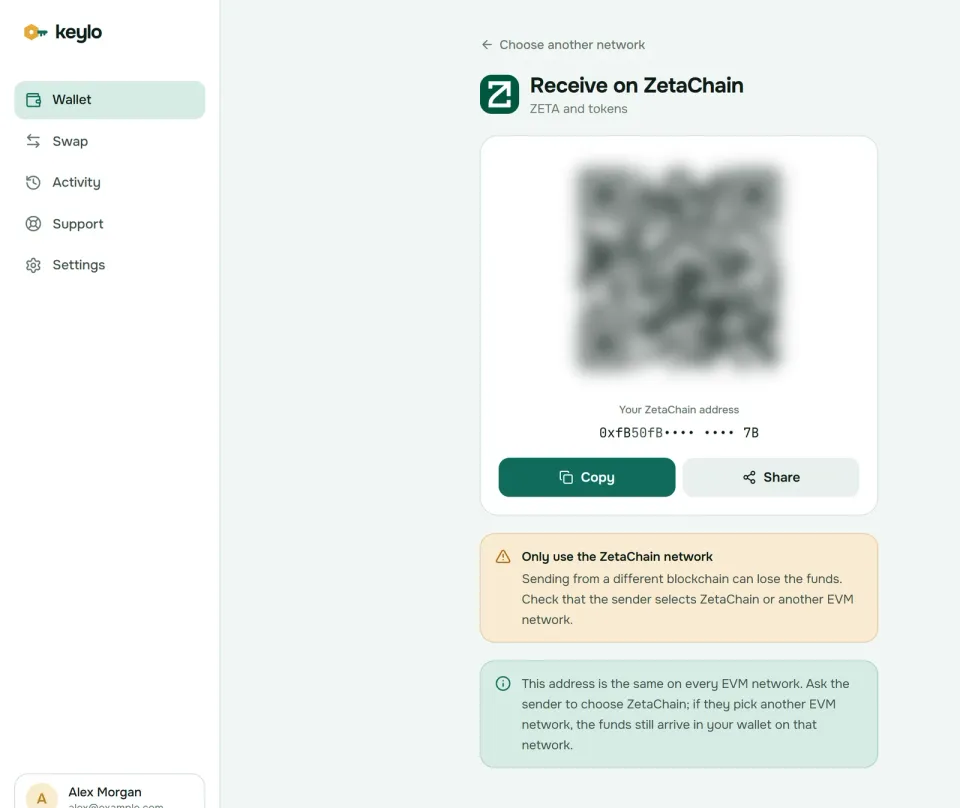
Keylo's Receive screen notes that every EVM network shares your ZetaChain wallet address. ERC-20 ZETA sent on Ethereum or BNB Smart Chain therefore still reaches you, but on that network, not on ZetaChain. You'd need ZetaHub or an exchange to turn it into native ZETA.
How to send ZETA on ZetaChain#
Tap Send and pick ZETA or a token you hold on ZetaChain.
Paste or scan a
0xaddress in To.Type an amount, or tap Max to send all your ZETA except the fee.
Tap Review and choose Slow, Normal or Fast.
Confirm the network, the whole address (with the first and last six characters in bold) and the fee in ZETA.
Tap Send. Keylo signs in your browser and shows "On its way", then "Sent", with a View on ZetaScan link.
Mistakes Keylo stops#
Keylo simulates each ZetaChain transfer before you sign, so a doomed transfer shows its error instead of burning a fee. It also flags:
An empty ZETA balance. Moving USDC.ETH without ZETA shows "You need some ZETA on ZetaChain to pay the network fee."
A contract recipient. Keylo warns you, since tokens sent to a contract that doesn't expect them usually can't be recovered.
The token's own contract. Keylo blocks it outright.
Bitcoin, Solana and
zeta1addresses. They aren't valid0xaddresses, so Keylo refuses them. That also stops you sending BTC.BTC to a Bitcoin address by mistake.
If a transfer stays pending, Speed up on the done screen resends it with a higher fee.
ZetaChain gas fees explained#
ZetaChain uses Ethereum's EIP-1559 fee model with a dynamic base fee and a tip. On October 24, 2026, the base fee was 10 gwei and the suggested tip 0.1 gwei. ZetaChain's token docs add that some ZETA is burned over time through EIP-1559.
Action | Gas | Approximate cost (October 24, 2026) |
|---|---|---|
Send ZETA | 21,000 | About 0.0002 ZETA |
Send a ZRC-20 or ERC-20 token | About 50,000 | About 0.0005 ZETA |
Withdraw a ZRC-20 to its home chain | Varies | ZetaChain gas plus the home chain's gas, paid in ZetaHub |
The base fee rises only when blocks fill up, but on October 24 they were nearly empty. So Slow, Normal and Fast cost almost the same, and all of them land in the next block. Keylo adds nothing to a normal send from your ZetaChain wallet.
Speed comes from CometBFT, which finalizes each block in one round. In a 1,000-block sample on October 24, 2026, blocks arrived every 3.8 seconds on average. After a block is in, it can't be reorganized.
What Keylo doesn't do on ZetaChain#
ZetaChain is built for moving value between chains, and that's exactly where Keylo stops.
No deposits or withdrawals between chains. Keylo can't turn BTC into BTC.BTC or send USDC.ETH back to Ethereum. Use ZetaHub with a wallet that connects, such as MetaMask.
No swap or bridge. Keylo's swap provider doesn't route ZetaChain, so swap ZRC-20 tokens in ZetaHub or another ZetaChain app.
No staking. ZetaChain is built with the Cosmos SDK, but Keylo treats it as an EVM network, and its staking screen doesn't include ZetaChain. Delegate through ZetaHub, Keplr or Leap instead.
No dapp connections. There's no browser extension and no WalletConnect.
No NFT transfers, testnet, hardware wallets or card purchases. NFTs you own do appear, read-only, under Collectibles on the ZetaChain page.
Keylo is non-custodial. Lose both your password and your recovery phrase, and nobody can open the wallet, Keylo included. For every network your phrase covers, see the list of Keylo networks.
ZetaChain scams and mistakes to avoid#
Fake ZetaHub sites and reward claims. Cross-chain apps attract "claim your reward" links that lead to lookalike pages. Type the address yourself, and never approve a signature you didn't start.
Lookalike ZRC-20 tokens. Anyone can deploy a token named BTC.BTC, and since Keylo lists every token at your address, a fake can sit next to the real one. Only the contracts in ZetaChain's registry are real ZRC-20s.
Wrong-network ZETA. ERC-20 ZETA on Ethereum or BNB Smart Chain can't pay ZetaChain gas. Check the network before you withdraw.
Address poisoning. Tiny transfers from addresses that start and end like yours land in your history. Copy addresses from the source.
Fake support. Keylo staff never ask for your phrase or password. Reach them through the Keylo help center, and read how Keylo protects accounts.
Before the first real transfer from your ZetaChain wallet:
Your recovery phrase is on paper and confirmed in Keylo.
You hold a little ZETA on ZetaChain for gas.
The withdrawal network says ZetaChain, not Ethereum or BNB Smart Chain.
Any
zeta1address went through the converter.You sent a small test amount first.
Related reading: the Cosmos Hub wallet guide walks through staking on a Cosmos chain, which Keylo can't do on ZetaChain, and the Bitcoin wallet guide covers the real BTC behind BTC.BTC.
Hold ZETA in a wallet only you control
Keylo encrypts your recovery phrase on your device and never sees it. Hold and send ZETA and ZRC-20 tokens from any browser.
ZetaChain wallet FAQ#
Is my zeta1 address the same as my 0x address?
Yes, when both come from the same key. ZetaChain is a Cosmos chain with an EVM, so one account has a bech32 zeta1 address and a hex 0x address, and both show the same balance. Use ZetaChain's address converter to switch between them. Keylo displays and accepts only the 0x form.
How do I add ZetaChain to MetaMask?
Add a network with chain ID 7000, currency ZETA and a public RPC from ZetaChain's network details, or let ZetaHub add it when you connect. In Keylo there's nothing to add. A MetaMask recovery phrase imported into Keylo opens the same ZetaChain account, because both use the path m/44'/60'/0'/0/0.
What are BTC.BTC and ETH.ETH on ZetaChain?
They're ZRC-20 tokens. BTC.BTC stands for bitcoin held in ZetaChain's vault on Bitcoin, and ETH.ETH for ether held on Ethereum. You can trade and send them on ZetaChain like any token, but returning them to their home chain takes a ZetaChain withdrawal, for example in ZetaHub. Keylo can hold and send them, not withdraw them.
Why don't my ZRC-20 tokens show up in my wallet?
Some EVM wallets list a token only after you import its contract address. Keylo instead reads ZetaScan's index of your address, so BTC.BTC, USDC.ETH and other ZRC-20s appear with no setup. If one is still missing, add it under Settings, Networks, Custom tokens with the contract from ZetaChain's registry and the exact decimals: 8 for BTC.BTC, 6 for USDC.ETH and 18 for ETH.ETH.
How much are gas fees on ZetaChain?
Small. On October 24, 2026, the base fee was 10 gwei with a 0.1 gwei tip, so a ZETA transfer cost about 0.0002 ZETA and a token transfer about 0.0005 ZETA. Withdrawing a ZRC-20 to its home chain costs more, because you also pay that chain's gas. Keylo shows the fee before you sign.
How do I stake ZETA?
Delegate ZETA to a validator in ZetaHub, Keplr or Leap. Delegators earn a share of block emissions, and any stake you withdraw is locked for 21 days first. Keylo can't stake ZETA: it treats ZetaChain as an EVM network, and its staking screen covers other Cosmos chains. Keep ZETA in Keylo if you like, but stake from one of those apps instead.
Which network should I use to withdraw ZETA from an exchange?
Choose ZetaChain to receive native ZETA that pays gas there. ZETA also exists as ERC-20 tokens on Ethereum, BNB Smart Chain and Polygon, and those arrive on that network instead. If the exchange wants a zeta1 address, convert your 0x address first. Send a small test amount before a large withdrawal.
How long does a ZetaChain transaction take?
Usually a few seconds. CometBFT finalizes each block in one round, typically in under five seconds, and blocks averaged 3.8 seconds in a sample on October 24, 2026. A finalized block can't be reversed. Cross-chain withdrawals take longer, because the home chain has to confirm too.