An Aptos wallet keeps the private key for an Aptos address and signs the transactions that move APT, USDC, USDT and other tokens out of it. Aptos is a proof-of-stake layer 1 built on the Move language. Most transfers cost a tiny fraction of an APT, and they usually confirm within a couple of seconds.
Three details catch newcomers. Aptos addresses look exactly like Sui addresses, the first transfer to someone who has never held a token costs extra, and the same token name can belong to several different assets. Once you know those, an Aptos wallet is simple to run. Figures below are as of October 2026.
Aptos at a glance#
Item | Aptos |
|---|---|
Native coin | APT (1 APT = 100,000,000 octas) |
Address format |
|
Gas price | 100 octas per gas unit on October 24, 2026, with 150 for priority |
Typical fee | About 0.00006 APT to send APT to an existing holder; about 0.0054 APT when the recipient is new; about 0.005 APT more on an address's first send |
Token standards | Fungible assets (the current standard) and the older Coin standard |
Stablecoins | Native USDC from Circle and USDT from Tether, both fungible assets |
Explorer | |
In Keylo | Send, receive, Aptos tokens, sent-transaction history, Aptos Testnet and Devnet. No staking, swaps, bridges, NFT view or dapp connections |
How an Aptos wallet works#
On Aptos, an account is an address plus the key that is allowed to sign for it. Your wallet doesn't hold coins, because the chain records balances. The key only proves you may move them.
Your Aptos wallet address#
An Aptos address is 32 bytes, written as 0x and 64 hexadecimal characters. It starts life as the authentication key: a hash of your public key and its signature scheme. Apps shorten addresses only for system accounts such as 0x1, so expect to see the full 64 characters for yours.
Sui uses the same 64-character shape, so nothing in the characters says which chain an address is for. Ethereum addresses, however, are shorter, with 40 hex characters. In Keylo each address sits under its network name, so copy your Aptos wallet address from the Aptos entry and nowhere else.
Keylo derives your Aptos key on m/44'/637'/0'/0'/0' with Ed25519, the hardened path the Aptos SDK expects for Ed25519 accounts.
Accounts, keys and key rotation#
Since AIP-115 (stateless accounts), an address doesn't need to be created on chain before it can be used. Any valid address can receive APT right away, with no activation deposit and no minimum balance. Your first outgoing transfer does write an account record for your address, though. In our October 24, 2026 test that added about 0.0049 APT, and Keylo includes it in the fee it shows.
Aptos also lets you rotate the key behind an account. The address never changes, but a different key signs for it from then on. If you rotated keys in another wallet, the old recovery phrase no longer controls that account, and Keylo will tell you it can't sign for it.
How to choose an Aptos wallet: extension, app or web#
Most Aptos wallets fit one of four types.
Aptos-first wallets. Petra is a browser extension, mobile app and web wallet for Aptos. Its site lists native staking, swaps, Ledger support, dapp connections and sign-in with Google or Apple without a seed phrase.
Hardware wallets. Devices such as Ledger keep the key off your computer and pair with a software wallet like Petra. They suit balances you rarely touch.
Exchange accounts. The exchange controls the keys and sets withdrawal rules.
Web wallets. These open in a browser tab with nothing to install. Keylo is one.
When you compare them, look for a wallet that shows the fee before you sign and identifies tokens by their address. It should also make clear when a transfer will pay a storage fee for a new recipient, and it should use the standard Aptos path, so your phrase works elsewhere.
Keylo is a good match if you want APT and stablecoins on Aptos alongside other chains, all under one recovery phrase, mostly to receive, hold and send. If you plan to stake APT, trade on Aptos DEXs or mint NFTs, a wallet such as Petra fits better, because Keylo connects to no apps.
How to create an Aptos wallet in Keylo#
There's nothing to download. Keylo opens in a phone or desktop browser, and you can save it to your home screen.
Go to the sign-up page. Enter your full name, email, phone number and a password, accept the terms and tap Create account.
Confirm your email if a "Check your inbox" message appears.
Under "Set up your wallet", tap Create a new wallet. A 12-word recovery phrase is generated on your device and locked with a key derived from your password (Argon2id, then AES-256-GCM) before anything is uploaded.
Find Aptos in the asset list. Its page shows "Your Aptos address" with copy and explorer buttons.
Write the phrase down: Settings, Recovery phrase, enter your password, copy the 12 words onto paper, then confirm the ones Keylo asks for.
Add Two-factor authentication and an Anti-phishing code in Settings too.
Keylo keeps only an encrypted copy of your wallet, and it can't decrypt it. If you forget your password, a reset restores your login, but only the recovery phrase restores the wallet.
Importing a wallet from Petra#
Tap Import a recovery phrase and enter the 12 or 24 words from your Petra backup. If that wallet's first account used the standard path, you'll see the same Aptos address and balance. Additional accounts and accounts created through Google or Apple sign-in won't appear in Keylo, and Keylo can't sign for an account whose key you rotated. Their funds remain where they were.
Practice on Aptos Testnet or Devnet#
Turn on Testnet mode in Settings under Networks. Keylo adds Aptos Testnet and Aptos Devnet, plus a link to the official Aptos faucet for free test APT. Test networks use the same address format as mainnet, so read the network label before you share one.
Get your Aptos address in a minute
Sign up with email and a password. Keylo creates the wallet in your browser, with an Aptos address and one for every other network it supports.
How to receive APT, USDC and USDT on Aptos#
Tap Receive and choose Aptos. You'll see "Receive on Aptos" with a QR code and "Your Aptos address".
Tap Copy or Share, or show the QR code to the sender.
On an exchange, select Aptos as the withdrawal network. USDT and USDC exist on many chains, so this step decides where the funds go.
Check your balance. Incoming transfers update it once they land, and you can confirm them on Aptos Explorer.
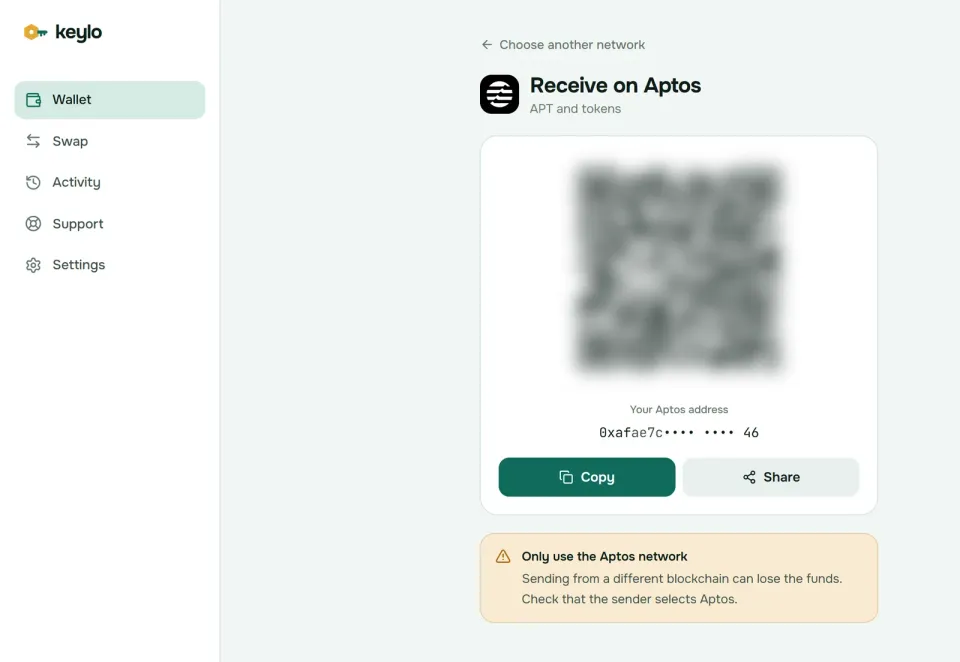
Your one Aptos address takes APT and every Aptos token, so you don't need to prepare anything before a new token arrives. Older guides mention registering a token before you can receive it, but that applied to the old Coin standard. With fungible assets, the transfer creates your token store and the sender pays its storage fee.
Keylo finds most tokens your address holds and lists them under Aptos. If one doesn't show up, add its address or coin type under Custom tokens in Settings.
How to send APT and tokens#
Tap Send and choose APT or a token on Aptos.
Paste the address into To or scan its QR code. Keylo accepts only
0xfollowed by 64 hex characters.Type an amount, or tap Max to send all your APT except the fee.
Tap Review, then pick Slow, Normal or Fast. Each option lists its cost.
Look over the network, the recipient with its first and last six characters in bold, and the fee.
Tap Send. You'll see "On its way" and then "Sent", with a link to Aptos Explorer.
What Keylo checks before you sign#
Keylo runs every Aptos transfer through the network's simulator before it signs, at each of the three fee levels. If the simulation fails, you see why, and nothing is sent:
No APT for the fee. A token send with no APT shows "You need some APT on Aptos to pay the network fee."
Too little for the amount plus fee. Keylo flags it on the review screen.
A frozen token store. Stablecoin issuers can freeze an address. If the sender or recipient is frozen, Keylo says so instead of failing on chain.
The wrong address type. A Solana or EVM address gets a message naming the network it seems to belong to. A Sui address looks valid, so check where it came from.
Keylo's activity list for Aptos shows the transfers you sent, with their fees and explorer links. Incoming transfers update your balance but don't appear in that list, so use Aptos Explorer to see them. Aptos transfers are final, so a send to a wrong but valid address can't be undone.
Aptos network fees and gas explained#
An Aptos fee has two parts. Execution and IO, measured in gas units and priced in octas per unit, pay for computing the transaction and spreading it across the network. That part is burned. Storage fees pay for new data your transaction leaves on chain, and Aptos prices them in fixed APT amounts, so they don't rise when the network gets busy.
Storage is refundable. When a transaction deletes data, the payer gets back the full storage fee paid for those slots. Explorers fold the storage fee into "gas used", which is why a transfer that creates a new token store looks so much bigger than one that doesn't.
On October 24, 2026, the network's gas estimate was 100 octas per unit, with 150 for priority. These are the costs we measured by simulating transfers on mainnet that day:
Transfer | Fee (as of October 24, 2026) |
|---|---|
APT to an address that already holds APT | About 62 gas units, 0.00006 APT |
APT to an address that never held APT | About 0.0054 APT, mostly the storage fee for the recipient's new APT store |
USDC to an existing USDC holder | About 148 gas units, 0.00015 APT |
USDC to someone who never held USDC | About 0.0057 APT, mostly storage |
Any first send from a never-used address | About 0.0049 APT extra, once, for your own account record |
Keylo's Fast option pays the network's prioritized estimate, 150 octas that day. Slow and Normal use the other two estimates, which often match on a quiet day. Per the Aptos docs, a higher price only helps a transaction get picked sooner for the next block. Keylo charges nothing on top of the network fee. The Aptos fee documentation explains the full model.
Tokens on Aptos: fungible assets and coins#
Aptos has two token standards. The older Coin standard names each token by a Move type such as 0x1::aptos_coin::AptosCoin. The newer fungible asset standard identifies each token by the address of its metadata object, and it's where new tokens and the major stablecoins now live. Keylo can hold and send both kinds.
Only that identifier proves which token you have, because anyone can launch a token called USDT. So check these against the issuers' own pages:
USDC from Circle:
0xbae207659db88bea0cbead6da0ed00aac12edcdda169e591cd41c94180b46f3b, listed on Circle's USDC address page.USDT from Tether: asset ID
0x357b0b74bc833e95a115ad22604854d6b0fca151cecd94111770e5d6ffc9dc2b.
Bridged versions such as LayerZero's zUSDC and zUSDT also exist on Aptos, along with plenty of tokens that simply copy the names. They are separate tokens, so before you send, ask the exchange or recipient which one they accept.
What Keylo doesn't do on Aptos#
Keylo's Aptos support covers receiving, holding and sending. These are the gaps, with what to do about each.
No swaps or bridges. Keylo's swap and bridge feature doesn't route to or from Aptos. Buy APT or USDT on an exchange and withdraw on the Aptos network, or use an Aptos wallet with built-in swaps.
No staking. Keylo stakes only on Cosmos SDK chains. Petra offers native APT staking.
No dapp connections. Without a browser extension or WalletConnect, Keylo can't sign in to Aptos DEXs, lending apps or games.
No NFTs. There's no NFT view on Aptos in Keylo, and it can't send NFTs.
No incoming history, name lookups, hardware wallets or card purchases. Paste full addresses, and check received transfers on the explorer.
Keylo is non-custodial, which cuts both ways. Keylo can't move or hold back your funds, but it also can't restore the wallet if both your password and recovery phrase are lost. The supported networks page lists the rest of what your phrase covers.
Aptos scams and mistakes to avoid#
Aptos fees are low enough that spam is cheap, and most losses come from what you sign, not from the chain.
Fake tokens and airdrops. Tokens and NFTs you didn't ask for may carry a website in their name. Those sites ask you to connect a wallet and approve something, and that approval drains it. Keylo lists tokens by whatever name their creator chose, so judge them by address and ignore the rest.
Sui and Aptos mix-ups. Both chains use 64-character
0xaddresses. Sending APT to a Sui address, or USDC on Sui to an Aptos one, usually means nobody holds a key for the address on that chain, so the funds are gone.Stablecoin lookalikes. Match the asset address, not the ticker. A bridged USDT is a different token from Tether's own.
Key rotation offers. A site that urges you to rotate your key, or to sign anything you don't understand, is a red flag. Rotation can hand your account to someone else.
Fake support. Keylo staff never ask for your recovery phrase or password. Contact the team through Keylo's help center, and read how Keylo protects your wallet.
A quick check before your first real transfer:
Your phrase is written down and confirmed in Keylo.
You hold a little APT for fees.
The exchange withdrawal network reads Aptos.
The address came from the Aptos entry, not the Sui one.
You tried a small amount first.
If you also hold coins on Sui or Solana, the Sui wallet guide and the Solana wallet guide explain their own rules.
Keep APT and stablecoins in a wallet only you control
Keylo encrypts your recovery phrase on your device and never sees it. Receive and send on Aptos and dozens of other networks.
Aptos wallet FAQ#
What is the best Aptos wallet?
It depends on how you'll use Aptos. Petra, a wallet built for Aptos, works as a browser extension, mobile app and web wallet, and supports staking, dapps and Ledger. If you mainly want to receive, hold and send APT and stablecoins next to other chains, with nothing to install, Keylo works. For large long-term balances, add a hardware wallet.
Can I use Keylo for Aptos without an app or extension?
Yes. Keylo is a web wallet: you open it in a browser on your phone or computer, and you can add it to your home screen so it starts like an app. There's nothing to download from an app store and no extension. If you need an extension to connect to Aptos apps, Petra offers one.
Is my Aptos address the same as my Sui address?
No. Both are 0x followed by 64 hex characters, but they come from different derivation paths and different hash functions, so the same recovery phrase gives two different addresses. They are also on separate chains. Coins sent to the wrong one don't move between them, so always copy the address from the right network.
Can I use my Petra recovery phrase in Keylo?
Yes. Tap Import a recovery phrase and enter the 12 or 24 words. Keylo derives Aptos on m/44'/637'/0'/0'/0', so a first account on that path shows the same address and balance. Extra accounts and Google or Apple sign-in accounts won't appear, and Keylo can't sign for a rotated key, but those funds stay safe in Petra.
Do I need APT to send USDT on Aptos?
Yes. Every Aptos transaction pays its fee in APT, whatever token it moves. In our USDC test on October 24, 2026, a stablecoin transfer to an existing holder cost about 0.00015 APT. If the recipient has never held the token, the sender also pays a storage fee of roughly 0.0055 APT. Keeping 0.05 APT next to your stablecoins covers plenty of transfers.
Why did my first Aptos transfer cost more?
Usually because something new was stored on chain, and the sender pays for storage. A recipient who never held the token needs a store for it: about 0.0053 APT for APT and 0.0056 APT for USDC on October 24, 2026. An address's own first send also writes its account record, about 0.0049 APT. After that, transfers cost only the small execution fee.
How much does it cost to send APT?
As of October 24, 2026, sending APT to an address that already holds it used about 62 gas units at 100 octas each, roughly 0.00006 APT. A transfer to a brand-new holder cost about 0.0054 APT. Keylo simulates the transfer and shows Slow, Normal and Fast prices before you sign, with no Keylo fee added.
Can I stake APT in a web wallet?
Not in Keylo, which supports staking only on Cosmos SDK chains. On Aptos you can receive, hold and send APT and tokens. To delegate APT and earn rewards, use a wallet with native Aptos staking, such as Petra, or an exchange that offers it. Your Keylo phrase can be imported into Petra if you want both.
What happens if I send APT to the wrong address?
Aptos transfers are final, and nobody can reverse them. If the address belongs to someone, only they can return the funds. If it's actually a Sui address, nobody holds a key for it on Aptos, so the coins are stuck. Keylo blocks addresses in the wrong format, but it can't tell a Sui address from an Aptos one.