An opBNB wallet is any EVM wallet that holds BNB and tokens on opBNB, BNB Chain's layer 2 network. opBNB runs on the OP Stack, the same software as Optimism and Base, but it settles on BNB Smart Chain instead of Ethereum. You use your normal 0x address and pay fees in BNB, and a simple transfer costs a tiny fraction of a cent.
The hard parts sit at the edges. You have to get BNB onto opBNB in the first place, add tokens by contract so they show up, and plan around the seven-day wait if you leave through the official bridge. Figures below were checked on October 24, 2026.
opBNB at a glance#
Item | opBNB |
|---|---|
Network type | OP Stack optimistic rollup that settles on BNB Smart Chain |
Gas coin | BNB |
Address format |
|
Chain ID | 204 |
Block time | 0.25 seconds since the Fourier hard fork of January 7, 2026 |
Typical fee | About 0.00000003 BNB for a BNB transfer, roughly $0.00002 |
Withdrawal to BSC | Seven-day challenge window on the official bridge |
Token standard | BEP20, the same ERC-20 style as BSC |
Explorers | opBNBScan and opBNB BscScan |
In Keylo | Send, receive, tokens added by contract, speed-up; no swaps, bridges, NFT view or testnet |
How opBNB works#
opBNB collects transactions, runs them on its own chain, and posts compressed batches and state roots to BNB Smart Chain. Its bridge contracts live on BSC too. Results count as valid unless someone challenges them during a seven-day window, which is the "optimistic" part. That window is also why the official exit to BSC takes a week.
Because it sits on BSC rather than Ethereum, opBNB's security rests on BSC's validators and the OP Stack contracts deployed there.
opBNB vs BNB Smart Chain#
Both networks use BNB for gas, and both accept the same address, so people mix them up all the time. They're still two separate chains with separate balances.
BNB Smart Chain (BSC), chain ID 56, is the main network. Exchanges call it BSC or BEP20.
opBNB, chain ID 204, is the layer 2. Blocks come four times a second, and fees are smaller still.
BNB at your address on BSC doesn't appear on opBNB until you bridge it, and the reverse is true too. In Keylo, the two show up as separate networks under the same 0x address.
Your opBNB wallet address#
Your opBNB wallet address is the 0x address you already use on BSC, Ethereum and every other EVM network, because it comes from the same key. Keylo derives it on m/44'/60'/0'/0/0. opBNB has no memo, no activation step and no minimum balance.
How to choose an opBNB wallet#
opBNB uses Ethereum's account model, so the choice is less about support than about what you'll do there.
Extension wallets. In MetaMask, you can add opBNB as a custom network: name opBNB, chain ID 204, currency BNB, and the RPC
https://opbnb-mainnet-rpc.bnbchain.orgfrom BNB Chain's docs. Extension wallets connect to opBNB games and to the official bridge.Hardware wallets. A device such as Ledger keeps the key offline and pairs with an extension wallet for opBNB.
Web wallets. Keylo already has opBNB in its network list, so there's nothing to configure.
Most opBNB activity happens inside games and apps. Keylo fits the simpler job of holding BNB and USDT on opBNB and sending them. It can't connect to opBNB apps or to the bridge site, so keep an extension wallet for those.
How to create an opBNB wallet in Keylo#
You don't need an opBNB wallet download: Keylo is a web app. Open it in a current browser on your phone or computer, and add it to your home screen if you like.
On the Keylo account page, fill in Full name, Email, Phone number, Password and Confirm password, accept the terms, and tap Create account.
Open the confirmation link if a "Check your inbox" message appears.
Tap Create a new wallet. Your browser creates a 12-word recovery phrase, then encrypts it with a key it derives from your password (Argon2id, then AES-256-GCM). The server keeps only that ciphertext.
Find opBNB in your asset list. Its page shows your
0xaddress and your BNB balance there.Back up the words: open Settings, tap Recovery phrase, re-enter your password, write the 12 words on paper and confirm a few when asked.
Set up Two-factor authentication and an Anti-phishing code from the same Settings screen.
Because Keylo never sees your password or phrase, it can't recover them. A reset email restores account access, not the wallet itself, so the paper copy matters.
Using a phrase from MetaMask or Trust Wallet#
Choose Import a recovery phrase and enter the 12 or 24 words. If the old wallet used the standard EVM path for its first account, you get the same address on opBNB and BSC, with the same balances. Accounts you added later in the old app aren't part of that first path, so they won't show up in Keylo.
Keylo has no opBNB testnet, so do your first real transfer with a small amount.
Your opBNB address in under a minute
Register with an email and a password. Keylo creates the wallet in your browser, with one 0x address for opBNB, BSC and every other EVM network.
How to receive BNB and USDT on opBNB#
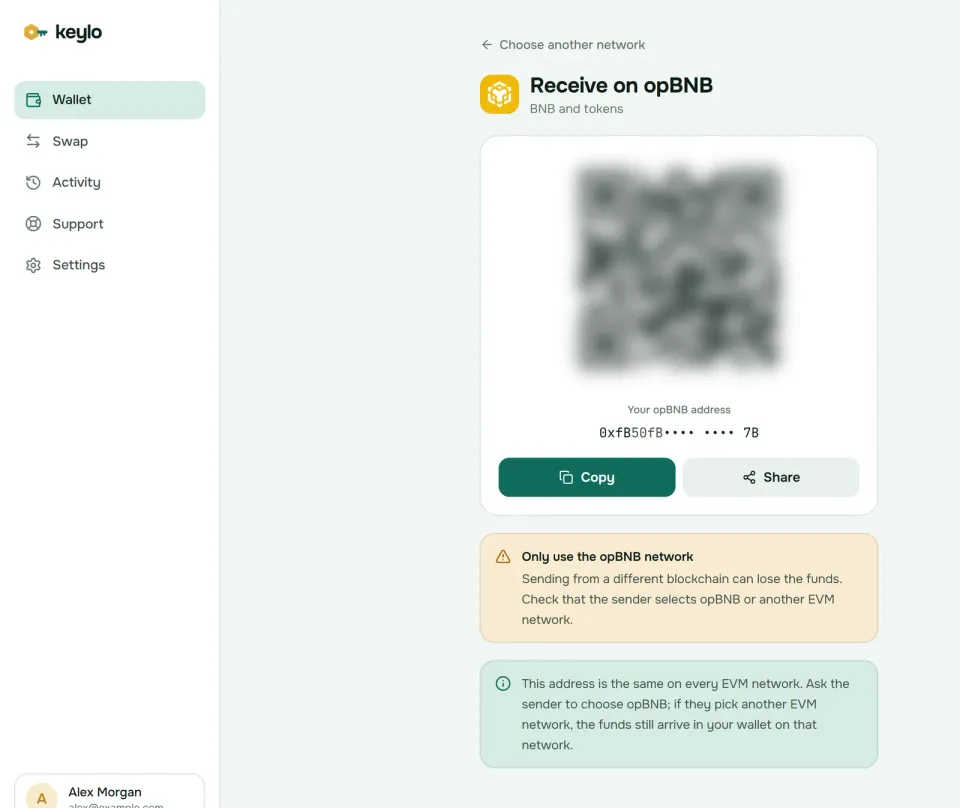
Tap Receive and choose opBNB. The screen says "Receive on opBNB" and shows a QR code.
Tap Copy or Share, or let the sender scan it.
Tell the sender to use the opBNB network. On an exchange, pick opBNB only if the withdrawal page lists it for that coin.
Check your opBNB balance. With blocks every quarter second, funds land almost at once.
Keylo's activity list on opBNB shows the transfers you send from Keylo. To see an incoming deposit in detail, tap the explorer button next to your address, which opens it on opBNB BscScan.
Many exchanges list only BNB Smart Chain for BNB and USDT. If you choose BSC (BEP20), the funds arrive at the same address but on BSC, under BNB Smart Chain in Keylo. They're safe there, and the next section covers getting them across.
Moving BNB between BSC and opBNB#
Keylo has no swap or bridge route for opBNB, because neither LI.FI nor THORChain covers the network. You can still move funds in three ways.
The official opBNB bridge#
The opBNB bridge is BNB Chain's own. It moves BNB and supported BEP20 tokens between the two chains.
BSC to opBNB. Connect a wallet on BNB Smart Chain, enter an amount and confirm. Once the deposit is processed, the BNB appears at the same address on opBNB, with no seven-day wait in this direction.
opBNB to BSC. Start the withdrawal on opBNB, then sign Submit Proof yourself. Wait out the seven-day challenge window, and finally sign a claim on BSC.
The bridge page opens on a community bridge tab, so switch to the official one if you want BNB Chain's route. And don't forget the proof step. BNB Chain's withdrawal guide notes that the seven days don't start until you submit it.
Keylo can't connect to the bridge site. To use it, import your recovery phrase into an extension wallet such as MetaMask. You'll get the same address there, so funds still land where Keylo can see them.
Community bridges and exchanges#
Third-party bridges such as zkBridge skip the seven-day wait, at the cost of trusting another operator. BNB Chain itself warns that community bridges may be less secure than the official one.
An exchange that supports opBNB can also act as a bridge. Deposit on one network, then withdraw on the other, and check both network lists first.
How to send BNB and tokens on opBNB#
Tap Send and pick BNB or a token on opBNB.
Paste or scan the recipient's address into To.
Type an amount or tap Max. For BNB, Max keeps back the fee.
Tap Review, then pick Slow, Normal or Fast. The gap between them is a fraction of a cent.
Check the network, the recipient's first and last six characters in bold, and the fee.
Tap Send. After "On its way" and "Sent", a View on opBNB (BSCScan) link opens the transaction.
What Keylo checks on opBNB#
Keylo test-runs the transfer and stops it if it would fail. It also stops a token send when there's no BNB on opBNB for the fee, and it warns when the recipient is a smart contract. Sending a token to its own contract address gets blocked, since anything sent there is usually lost.
Before you send to an exchange, confirm it credits that coin on opBNB. A BSC deposit address looks the same, but an exchange that watches only BSC won't see the transfer. If a transfer sits pending, the done screen offers Speed up.
opBNB gas fees explained#
Every opBNB transaction pays two parts in BNB. The first is execution on opBNB: gas used times the gas price, which was about 0.001 gwei on October 24, 2026. The second is a data fee for posting your compressed transaction to BNB Smart Chain.
On that day, a plain BNB transfer used 21,000 gas. It paid roughly 0.000000021 BNB for execution plus about 0.0000000065 BNB for data. At a BNB price near $730, that's about $0.00002. BNB Chain's stated target is under $0.001 per transfer, and the network sits well below it.
An estimate that counted only the execution part would look close to zero. Keylo adds the BSC data fee to its estimate, so the review screen shows the real total. Keylo adds no fee of its own.
opBNB has also kept speeding up. The Volta hard fork in April 2025 cut blocks from 1 second to 0.5, and Fourier halved that again on January 7, 2026. The Fourier announcement has the details.
Tokens on opBNB#
opBNB tokens follow the same BEP20 standard as BSC, but every token has its own contract on opBNB. Keylo doesn't detect opBNB tokens on its own, so you add each one you hold. Go to Settings, then Networks, then Custom tokens, tap Add token, choose opBNB, then paste the contract address and type the symbol and decimals.
The USDT most people use on opBNB is 0x9e5AAC1Ba1a2e6aEd6b32689DFcF62A509Ca96f3, with 18 decimals. That contract is the official bridge's version of BSC's USDT, so you can bridge it back one for one. Wrapped BNB sits at 0x4200000000000000000000000000000000000006.
Check any other contract on the opBNB explorer before you trust it. Cheap fees make spam tokens and fake airdrops easy, and many game tokens barely trade outside their own app.
What Keylo doesn't do on opBNB#
No swaps or bridges. No route covers opBNB in Keylo, so use the official bridge or an exchange instead. Once funds reach BSC, the BSC wallet guide explains the swap routes there, and the swap and bridge page shows how routes work.
No dapp connections. Keylo has no browser extension and no WalletConnect, so opBNB games and apps won't connect.
No NFT view. Keylo can't show or send NFTs on opBNB. They stay at your address on chain.
No staking, no hardware wallets and no card purchases.
Keylo is non-custodial. If both your password and your phrase are gone, nobody can open the wallet, Keylo included. The Keylo network list shows everything else your phrase covers.
opBNB scams and mistakes to avoid#
The wrong network. BSC and opBNB look alike in every menu. Read the chain name, or the chain ID 204, before you sign anything.
A forgotten proof. An official-bridge withdrawal that skips Submit Proof never starts its seven days. Fake "support" agents may then offer to speed it up, and they always end by asking for your phrase.
Spam tokens and airdrops. Tokens that name a website, or claim pages promising opBNB rewards, lead to drainer sites. Ignore them.
Copied addresses. Address-poisoning spam is cheap on a network this fast. Copy an address from its source, not from your history.
Impersonators. Keylo staff never ask for your recovery phrase or password. Reach the team through the Keylo help center, and read how Keylo protects accounts.
A short check before your first real transfer:
The 12 words are on paper and confirmed in Keylo.
You hold a little BNB on opBNB, not just on BSC.
Each opBNB token you hold sits under Custom tokens.
The sender or exchange chose opBNB.
A small test arrived first.
OP Stack chains on Ethereum work much the same way, as the Optimism wallet guide shows.
Keep BNB on opBNB in a wallet only you control
Keylo encrypts your phrase on your device and never sees it. Hold and send on opBNB, BSC and more from one place.
opBNB wallet FAQ#
Is opBNB the same as BNB Smart Chain?
No. opBNB is a separate layer 2 network that settles on BNB Smart Chain. Both use BNB for gas and share your 0x address, but they keep separate balances. BNB sent on BSC shows under BNB Smart Chain in Keylo, and BNB sent on opBNB shows under opBNB. Moving between them takes a bridge or an exchange.
How do I get BNB onto opBNB?
Withdraw BNB from an exchange that lists opBNB, or bridge it from BNB Smart Chain. Deposits through BNB Chain's official bridge skip the seven-day wait that applies to withdrawals, but the bridge needs a wallet that connects to websites, such as MetaMask with your phrase imported. Keylo can't bridge to opBNB itself. Once BNB arrives, Keylo shows it under opBNB at your usual address.
How long does it take to withdraw from opBNB to BSC?
About seven days through the official bridge, and longer if you forget a step. You start the withdrawal on opBNB, submit a proof to begin the challenge window, wait seven days, then claim on BSC. Third-party bridges and some exchanges are faster, with their own fees and trust assumptions.
Why don't my tokens show up on opBNB in Keylo?
Keylo doesn't detect opBNB tokens automatically. Add each one under Settings, Networks, Custom tokens with its contract address, symbol and decimals. For USDT on opBNB, use 0x9e5AAC1Ba1a2e6aEd6b32689DFcF62A509Ca96f3 with 18 decimals. The tokens were safe at your address all along, and they appear with their balance once you add them.
How much does a transaction cost on opBNB?
Very little. On October 24, 2026, a plain BNB transfer cost about 0.00000003 BNB, roughly $0.00002, including the fee for posting data to BNB Smart Chain. Contract calls cost more but stay far below a cent. Keylo shows the full fee, data part included, before you confirm.
Can I send BNB from opBNB to a BNB Smart Chain address?
Not directly. A normal send stays on opBNB, so the BNB lands at that address on opBNB, not on BSC. That works if the recipient's wallet shows opBNB, but an exchange that watches only BSC won't credit it. To move BNB to BSC, use a bridge or an exchange that supports both. If you already sent it, it's safe at that address on opBNB.
How do I add opBNB to Trust Wallet or MetaMask?
If opBNB isn't in your wallet's network list, add a custom network: name opBNB, chain ID 204, currency BNB, RPC https://opbnb-mainnet-rpc.bnbchain.org and explorer https://opbnbscan.com, all from BNB Chain's docs. Whether a mobile app lets you add networks depends on the app and version, so check its help pages. In Keylo, opBNB is already listed.
Does opBNB use Ethereum?
Not for settlement. opBNB runs the OP Stack, the same software as Optimism and Base, but it posts its data and state to BNB Smart Chain, and its bridge contracts live there. Its security therefore depends on BSC rather than Ethereum, and its fees track BSC's costs, not Ethereum's.